
1. Pengantar Queue Tree
Queue Tree adalah metode shaping bandwidth pada MikroTik berbasis hierarchical queue, di mana trafik dikelompokkan ke dalam “tree” (pohon) yang memiliki parent, child, dan priority.
Queue Tree biasa dipakai untuk:
- Pembagian bandwidth per VLAN / Interface
- Limitasi per jenis trafik (Browsing, Streaming, Gaming)
- QoS (Quality of Service)
- Prioritas trafik penting (VoIP, ERP, Payment, dsb)
Agar Queue Tree bekerja optimal, trafik harus ditandai (marking) di mangle firewall.
2. Konsep Dasar Marking
Queue Tree hanya membaca Packet Mark, bukan Connection Mark.
Sebab itu:
- Kita mark connection → mark packet → queue tree
- Jika langsung mark packet tanpa mark connection, hasilnya tidak optimal.
3. Alur Proses QoS dengan Mangle (BEST PRACTICE)
3.1 Mark Connection
Menandai connection berdasarkan protokol atau IP tujuan.
Contoh:
- Streaming ke YouTube
- Social Media
- Game Online
3.2 Mark Packet
Dari connection yang sudah ditandai → diturunkan menjadi packet mark.
3.3 Queue Tree
Packet mark digunakan di queue tree untuk melakukan shaping, limit, dan priority.
4. Contoh Topologi Sederhana
- Internet → ether1 (WAN)
- LAN → ether2 / VLAN 10 / VLAN 20 / VLAN 30
Misal total bandwidth:
- Download: 100 Mbps
- Upload: 50 Mbps
5. Setting Mangle (Marking)
5.1 Mark Connection (Download)
YouTube sebagai contoh streaming.
/ip firewall mangle
add chain=prerouting dst-address-list=YOUTUBE connection-mark=no-mark action=mark-connection new-connection-mark=conn_stream_download passthrough=yes
5.2 Mark Packet (Download)
/ip firewall mangle
add chain=prerouting connection-mark=conn_stream_download action=mark-packet new-packet-mark=packet_stream_download passthrough=no
5.3 Mark Connection (Upload)
/ip firewall mangle
add chain=postrouting src-address-list=YOUTUBE connection-mark=no-mark action=mark-connection new-connection-mark=conn_stream_upload passthrough=yes
5.4 Mark Packet (Upload)
/ip firewall mangle
add chain=postrouting connection-mark=conn_stream_upload action=mark-packet new-packet-mark=packet_stream_upload passthrough=no
6. Membuat Queue Tree
Queue Tree mengharuskan parent berada pada interface yang benar.
6.1 Parent Download (global)
/queue tree
add name=DOWNLOAD parent=global packet-mark="" max-limit=100M
6.2 Parent Upload
/queue tree
add name=UPLOAD parent=global packet-mark="" max-limit=50M
6.3 Child Queue untuk Streaming (Download)
/queue tree
add name=stream_download parent=DOWNLOAD packet-mark=packet_stream_download limit-at=10M max-limit=30M priority=2
6.4 Child Queue untuk Streaming (Upload)
/queue tree
add name=stream_upload parent=UPLOAD packet-mark=packet_stream_upload limit-at=5M max-limit=10M priority=2
7. Setting Queue untuk VLAN
Jika ingin queue per VLAN, buat parent per interface VLAN.
Misal:
- VLAN10 = 30 Mbps
- VLAN20 = 40 Mbps
- VLAN30 = 30 Mbps
Parent VLAN Download
/queue tree
add name=vlan10_download parent=ether2 packet-mark="" max-limit=30M
add name=vlan20_download parent=ether2 packet-mark="" max-limit=40M
add name=vlan30_download parent=ether2 packet-mark="" max-limit=30M
Untuk packet mark tertentu (misalnya gaming):
/queue tree
add name=v10_gaming parent=vlan10_download packet-mark=packet_game_download limit-at=5M max-limit=10M priority=1
8. Cara Kerja “limit-at”, “max-limit”, dan “priority”
| Parameter | Fungsi |
|---|---|
| limit-at | Jatah bandwidth minimal (dijamin) |
| max-limit | Batas maksimal saat kondisi idle |
| priority | 1 = paling tinggi, 8 = paling rendah |
Contoh:
- Streaming priority 2
- Browsing priority 4
- Downloading priority 6
- Torrent priority 8
Jika trafik penuh, urutan prioritas akan menentukan siapa yang dapat bandwidth lebih dulu.
9. Best Practice Konfigurasi
Berikut tips profesional sering dipakai untuk ISP / kantor:
✓ 1. Mark connection dulu, baru mark packet
Mengurangi CPU usage dan lebih akurat.
✓ 2. Gunakan chain prerouting (download) & postrouting (upload)
Rekomendasi MikroTik.
✓ 3. Parent harus interface RX/TX yang benar
- Download → interface LAN
- Upload → interface WAN
✓ 4. Hindari Queue Simple + Queue Tree bersamaan
Bisa konflik shaping.
✓ 5. Gunakan FastTrack = Off untuk queue tree
Atau lakukan bypass hanya trafik tertentu.
10. Contoh Konfigurasi Lengkap (Copy-Paste)
/ip firewall mangle
add chain=prerouting dst-address-list=YOUTUBE action=mark-connection new-connection-mark=conn_stream_download passthrough=yes
add chain=prerouting connection-mark=conn_stream_download action=mark-packet new-packet-mark=packet_stream_download passthrough=no

add chain=postrouting src-address-list=YOUTUBE action=mark-connection new-connection-mark=conn_stream_upload passthrough=yes
add chain=postrouting connection-mark=conn_stream_upload action=mark-packet new-packet-mark=packet_stream_upload passthrough=no

/queue tree
add name=DOWNLOAD parent=global max-limit=100M
add name=UPLOAD parent=global max-limit=50M

add name=stream_download parent=DOWNLOAD packet-mark=packet_stream_download limit-at=10M max-limit=30M priority=2
add name=stream_upload parent=UPLOAD packet-mark=packet_stream_upload limit-at=5M max-limit=10M priority=2
11. Verifikasi Queue Tree
Untuk melihat mana yang aktif:
/queue tree print stats
Atau real-time:
/queue tree monitor 0
Jika tidak bergerak:
- Parent salah interface
- FastTrack masih aktif
- Packet-mark tidak dikenali
- Salah chain (postrouting/prerouting)
12. Contoh Kasus
ISP -> ether 1
BW -> 100 Mb  up/down
VLAN -> 3
A. Setup Mangle ( IP -> Firewall -> Mangle )

Buat prerouting ( download )
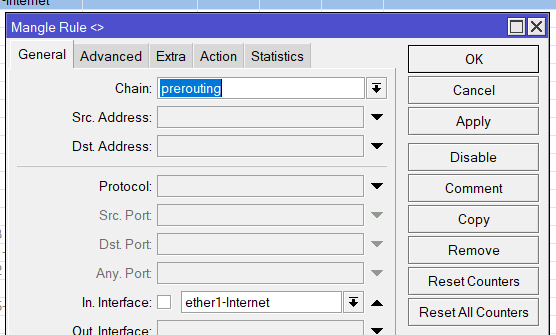
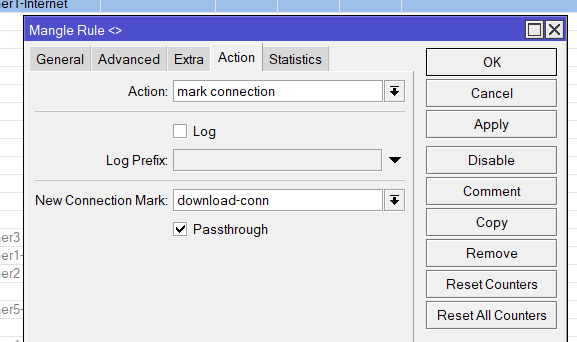
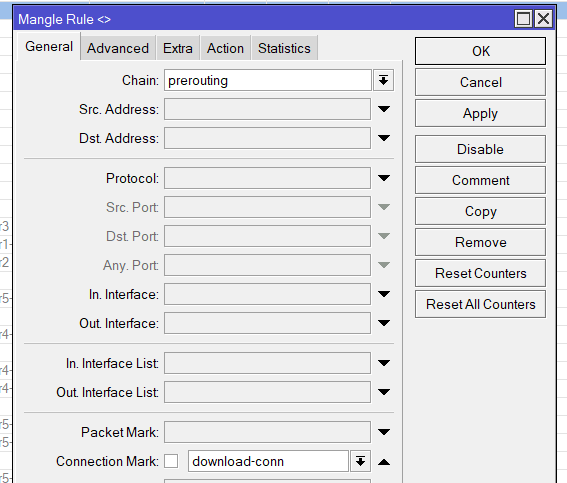
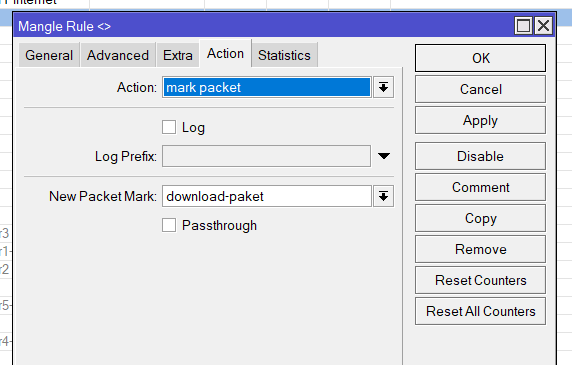
Buat Postrouting ( Upload )
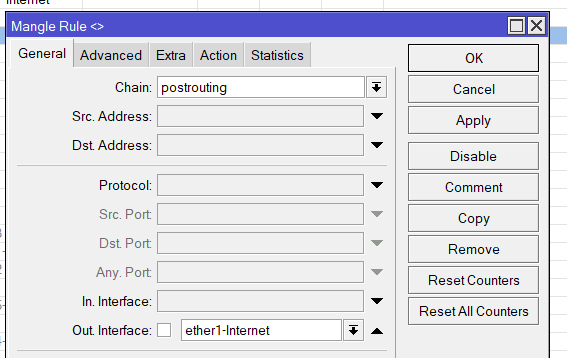
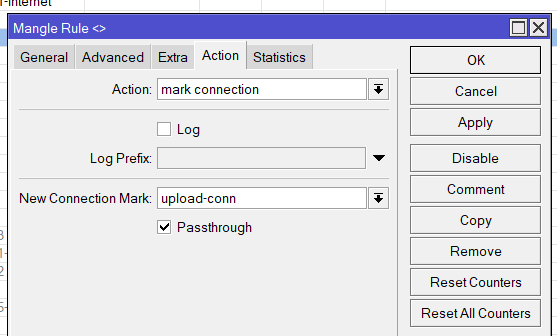
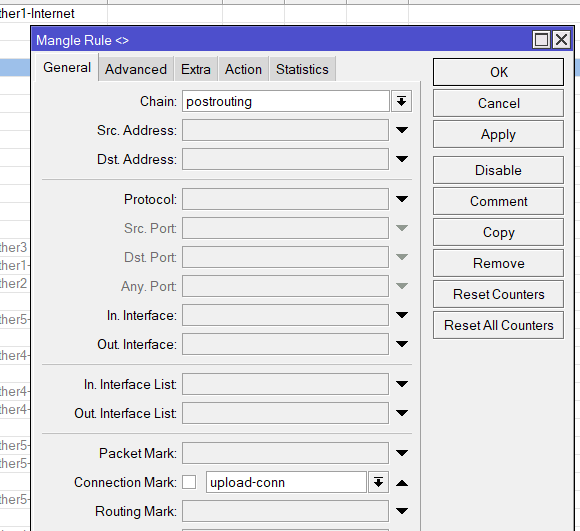
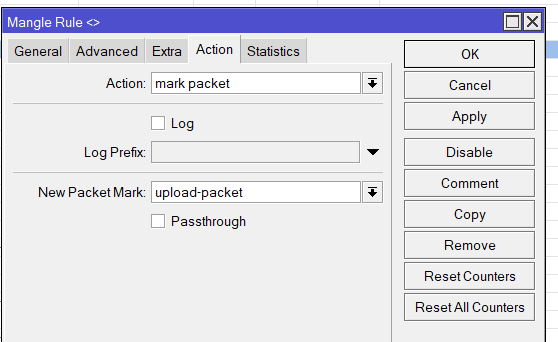
B. Setup Queue Type ( Queue -> Queue Type )
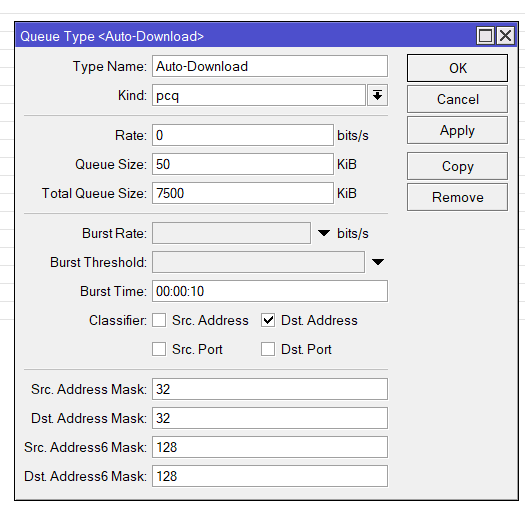
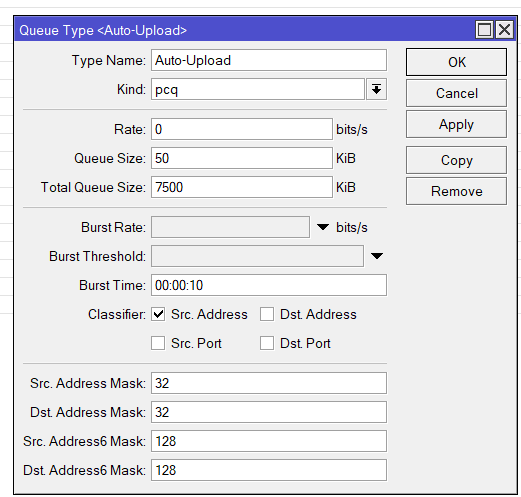
C. Buat Queue Tree (Queue -> Queue Tree)

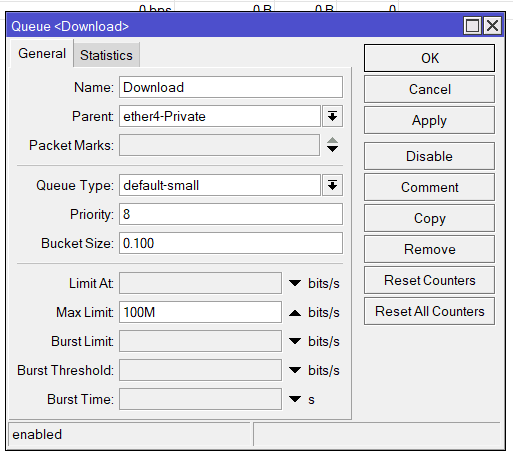
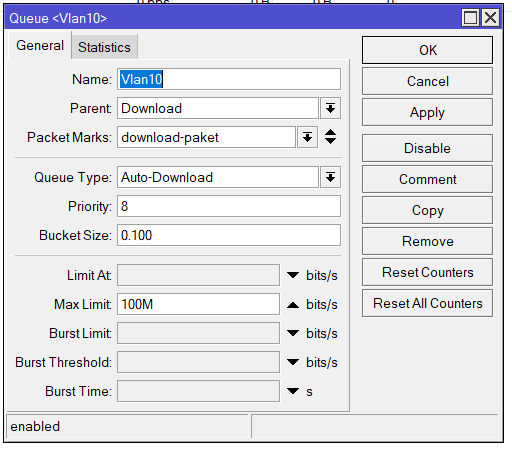
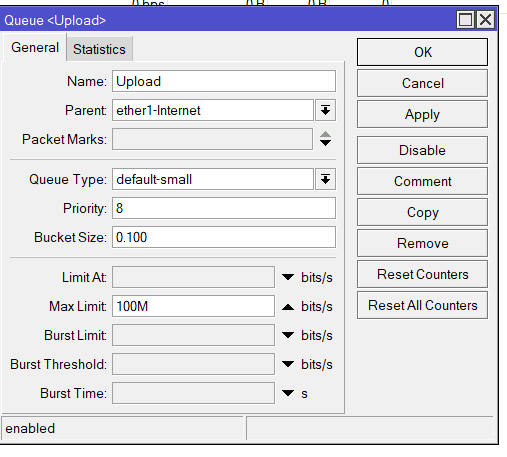
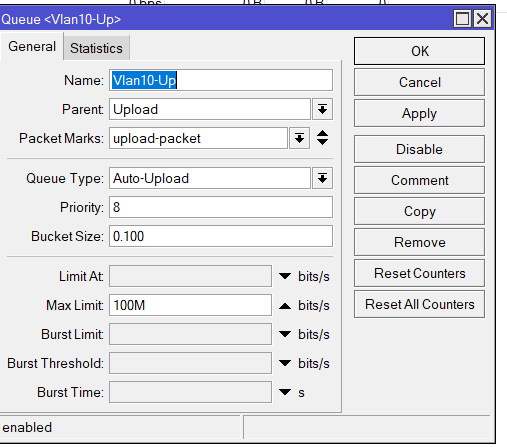
Solusi Lain nya di buat per VLAN

A. Buat Mangle per Vlan
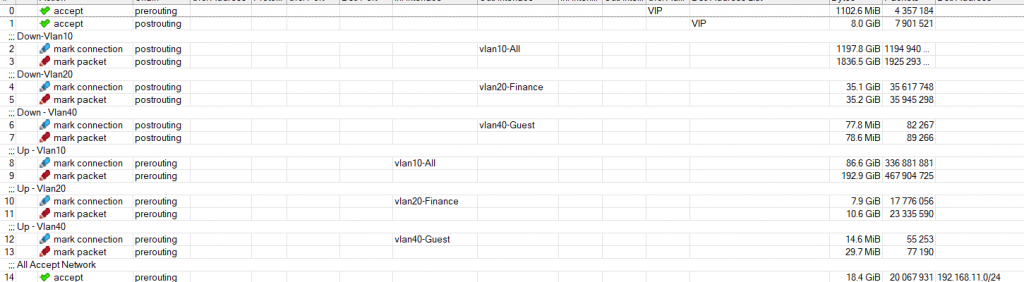
Misal Vlan 10
- Down-Vlan10
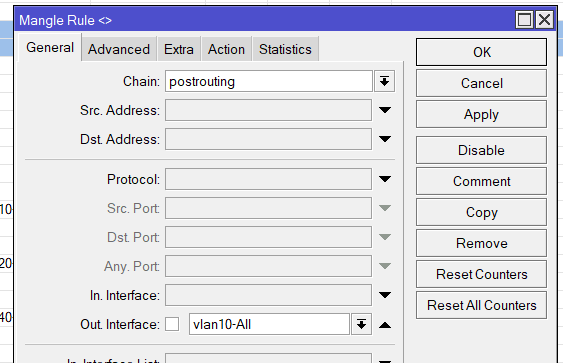
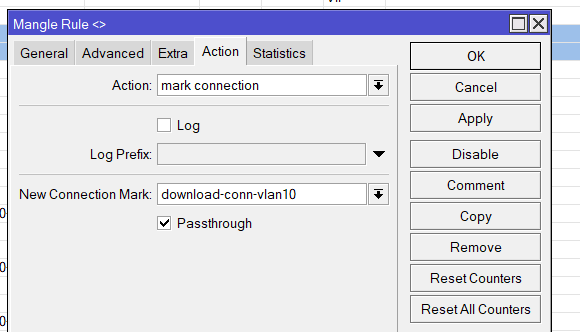
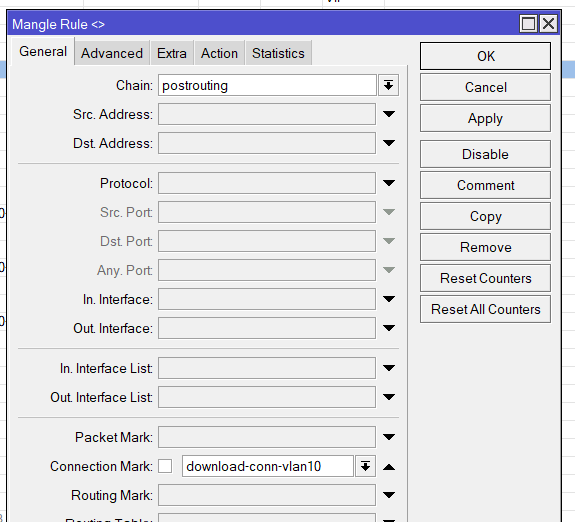
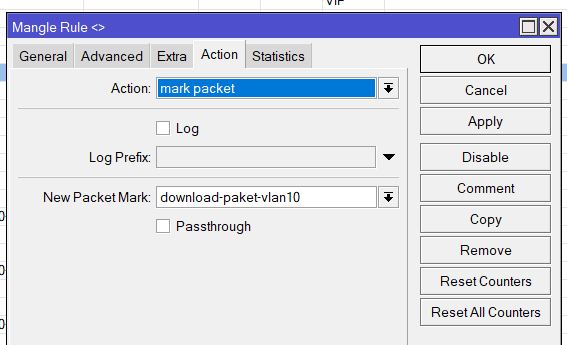
- Up-VLAN-10
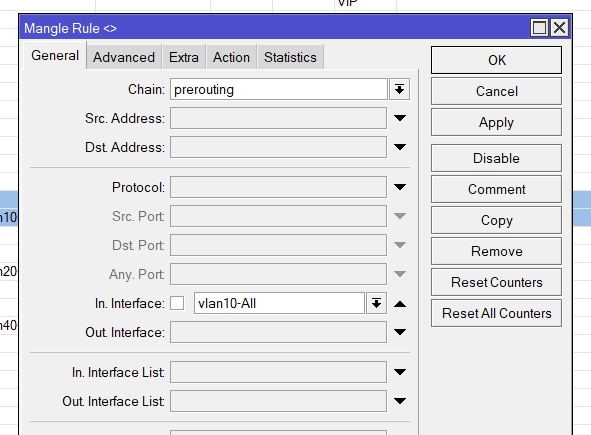
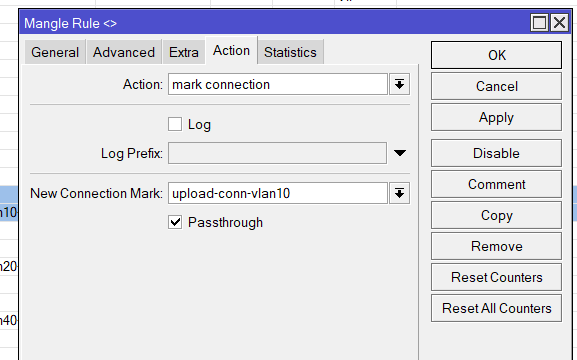
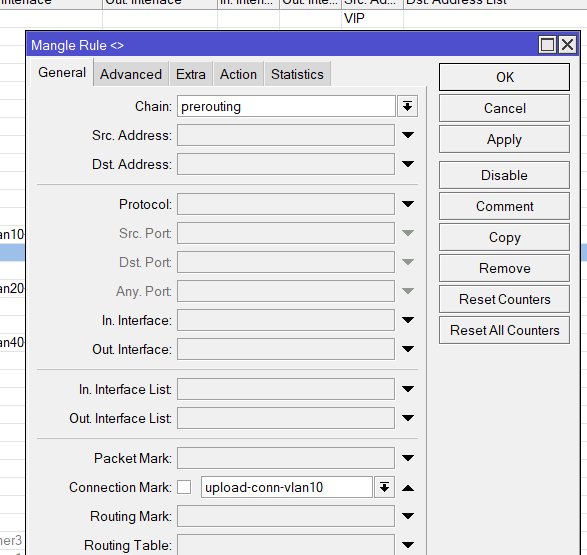
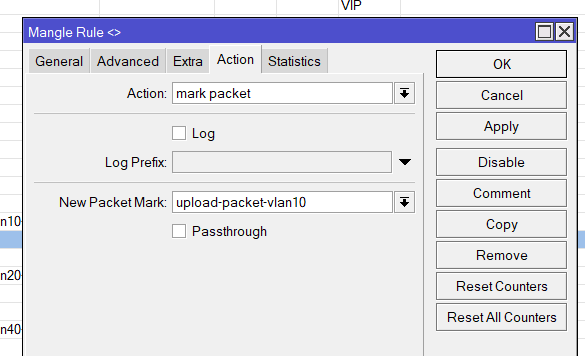
- Tambahkan juga untuk yang di bypass
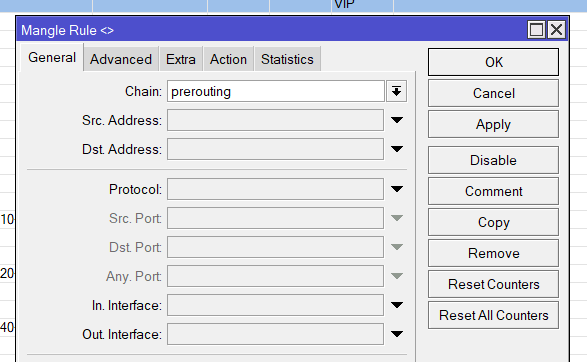
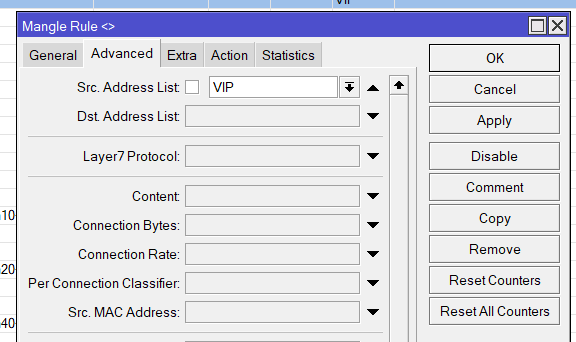
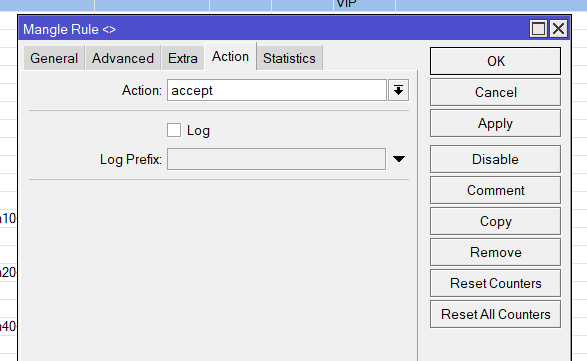
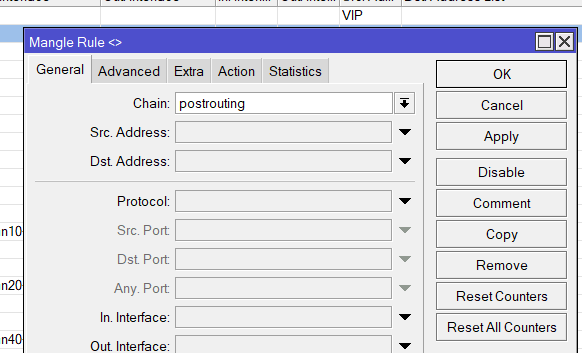
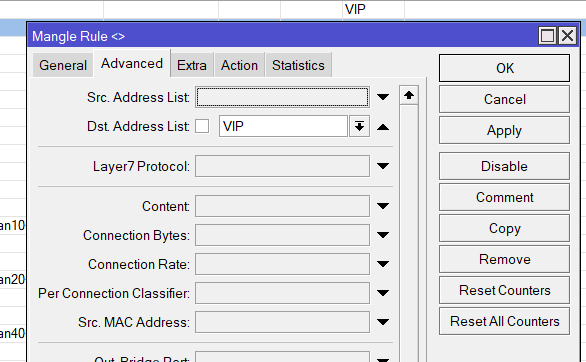
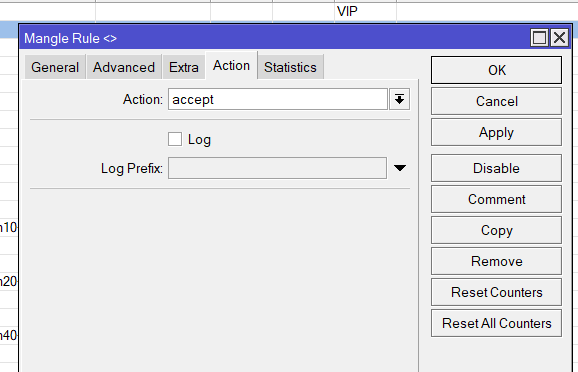
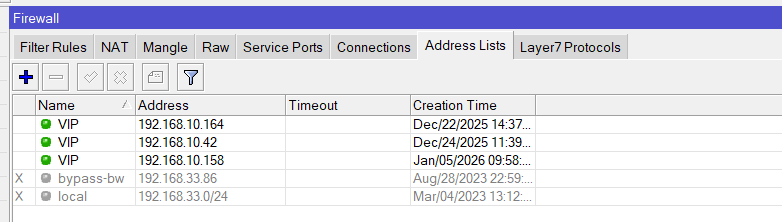
B. Setup Queue type
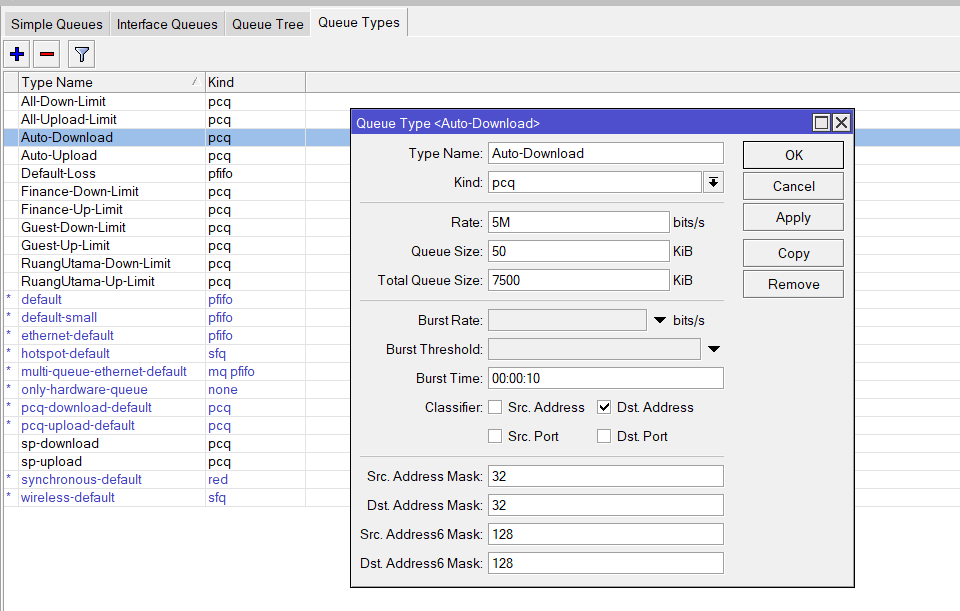
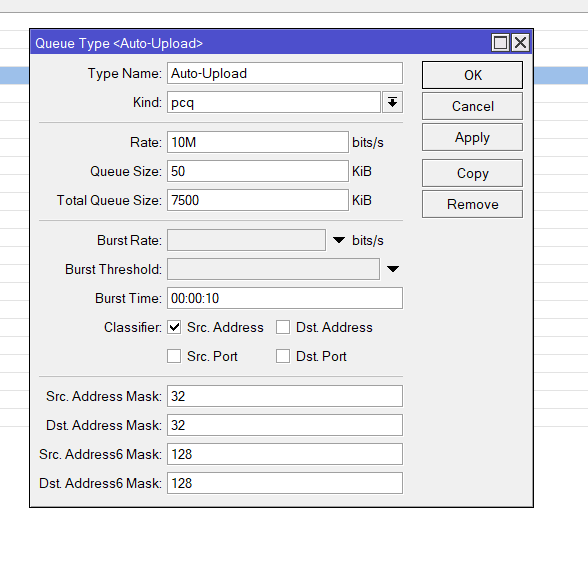
C. Setup Quee Tree
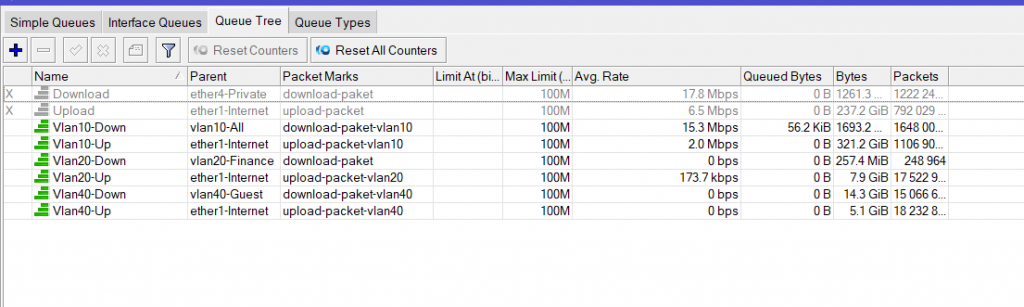
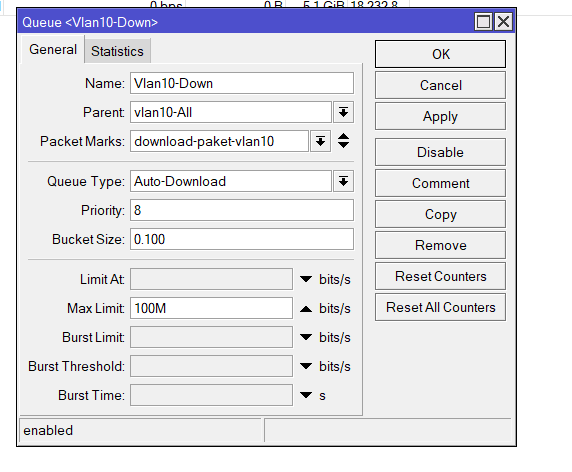
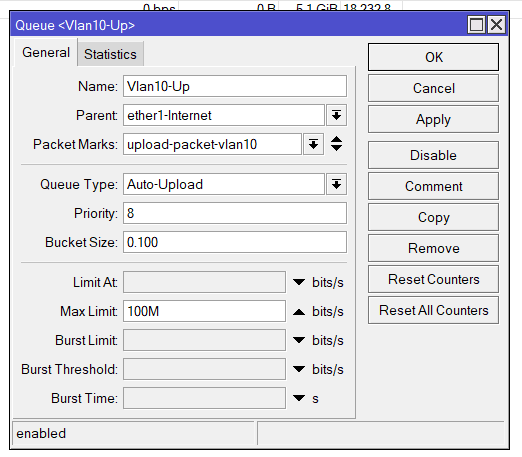
Tambahkan juga untuk VLAN lain nya.
13. Penutup
Dengan metode Mark Connection + Mark Packet, Queue Tree menjadi jauh lebih stabil dan akurat. Artikel ini bisa diterapkan pada:
✓ Jaringan kantor
✓ RT/RW Net
✓ ISP kecil
✓ VLAN multiple network
✓ QoS per aplikasi (YouTube, Netflix, Game Online, Zoom, dll)