
Apa Itu Microsoft Intune?
Microsoft Intune adalah layanan Mobile Device Management (MDM) dan Mobile Application Management (MAM) berbasis cloud yang digunakan untuk mengelola:
- Laptop Windows
- MacBook
- Android
- iPhone/iPad
- Aplikasi perusahaan
- Policy keamanan
- Endpoint perusahaan
Intune menjadi bagian dari ekosistem:
Dengan Intune, administrator dapat:
- Install aplikasi otomatis
- Memaksa password policy
- Remote wipe device
- Monitoring compliance
- Deploy konfigurasi WiFi/VPN
- Integrasi dengan Defender
- Zero-touch deployment Windows
Kenapa Microsoft Intune Banyak Dipakai?
Keuntungan Utama
1. Cloud Based
Tidak perlu server on-premise seperti:
- SCCM tradisional
- WSUS
- Active Directory lokal penuh
2. Mendukung Banyak Device
- Windows 10/11
- macOS
- Android
- iOS/iPadOS
3. Keamanan Tinggi
Integrasi dengan:
- Conditional Access
- MFA
- Microsoft Defender
- Compliance policy
4. Remote Management
Admin bisa:
- Lock device
- Reset password
- Hapus data perusahaan
- Push aplikasi
Lisensi yang Dibutuhkan
Paket Yang Mendukung Intune
| Paket | Intune |
|---|---|
| Microsoft 365 Business Premium | ✅ |
| Microsoft 365 E3 | ✅ |
| Microsoft 365 E5 | ✅ |
| Enterprise Mobility + Security (EMS) | ✅ |
Cek detail lisensi resmi:
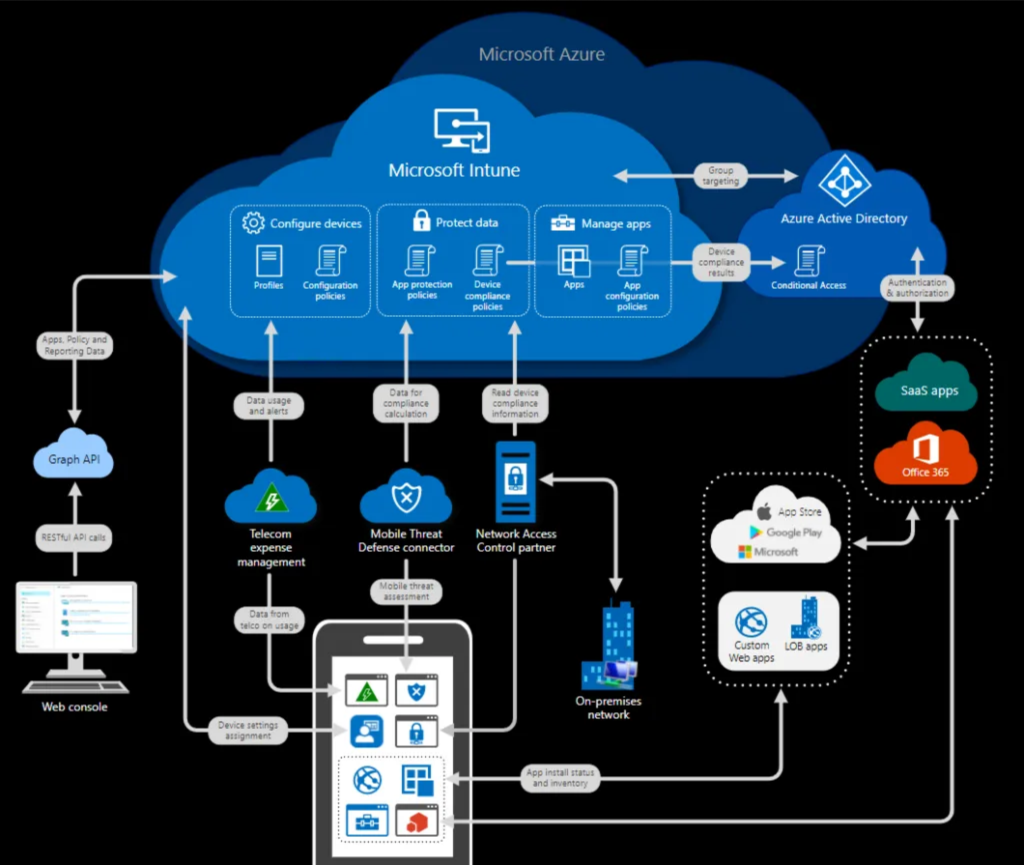
Arsitektur Microsoft Intune
Komponen Utama
1. Microsoft Entra ID
Dulu disebut Azure AD.
Digunakan untuk:
- Login user
- Authentication
- Conditional Access
- Join device
2. Intune Admin Center
Portal utama management device.
3. Endpoint Devices
Device user:
- Laptop
- HP
- Tablet
4. Company Portal
Aplikasi untuk enroll device dan install aplikasi perusahaan.
Persiapan Sebelum Install Intune
Yang Harus Disiapkan
Domain Perusahaan
Contoh:
- perusahaan.com
Akun Administrator
Contoh:
Lisensi Intune
Device Test
Minimal:
- Windows 11
- Android/iPhone
Cara Aktivasi Microsoft Intune
Step 1 — Login Admin Center
Buka:
Login menggunakan akun administrator.
Step 2 — Assign License
Masuk ke:
- Users
- Active Users
- Pilih user
- Licenses and Apps
- Centang Intune
Step 3 — Akses Intune Admin Center
Buka:
Jika berhasil masuk berarti Intune aktif.
Setup Awal Microsoft Intune
1. Configure MDM Authority
Biasanya otomatis:
- Microsoft Intune
2. Setup Enrollment
Masuk:
- Devices
- Enrollment
3. Configure Automatic Enrollment
Masuk:
- Devices
- Windows
- Automatic Enrollment
Aktifkan:
- MDM User Scope → All
Integrasi Microsoft Entra ID
Join Device ke Entra ID
Masuk:
- Devices
- Windows Enrollment
Aktifkan:
- Azure AD Join
Cara Join Windows ke Intune
Metode 1 — Manual Join
Di Windows 11
Buka:
- Settings
- Accounts
- Access Work or School
- Connect
Masukkan akun Microsoft perusahaan.
Setelah login:
- Device otomatis masuk Intune
Cara Cek Device Sudah Masuk Intune
Masuk:
- Devices
- All Devices
Akan terlihat:
- Device Name
- Compliance
- Owner
- OS Version
Install Company Portal
Windows
Install melalui:
- Microsoft Store
Android
Install:
Intune Company Portal
iPhone
Install:
Company Portal
Setup Compliance Policy
Fungsi Compliance Policy
Untuk memastikan device aman.
Contoh:
- Password wajib
- Antivirus aktif
- OS minimum tertentu
- BitLocker aktif
Cara Membuat Compliance Policy
Masuk:
- Devices
- Compliance Policies
- Create Policy
Pilih:
- Windows 10 and later
Contoh Policy
| Setting | Value |
|---|---|
| Password Required | Yes |
| BitLocker | Required |
| Secure Boot | Required |
| TPM | Required |
Conditional Access
Fungsi
Memblokir device yang tidak compliant.
Contoh:
- Device belum terenkripsi → tidak boleh akses email
Setup Conditional Access
Masuk:
- Entra Admin Center
- Protection
- Conditional Access
Buat policy:
- Require compliant device
Deploy Aplikasi Menggunakan Intune
Jenis Aplikasi
| Type | Support |
|---|---|
| MSI | ✅ |
| EXE | ✅ |
| Microsoft Store | ✅ |
| Win32 App | ✅ |
| Android APK | ✅ |
Deploy Aplikasi Windows
Step
Masuk:
- Apps
- Windows Apps
- Add
Pilih:
- Win32 App
Upload:
- installer.intunewin
Cara Convert EXE ke Intunewin
Download tool resmi:
Microsoft Win32 Content Prep Tool
Command:
IntuneWinAppUtil.exe -c C:\App -s setup.exe -o C:\OutputDeploy Script PowerShell
Fungsi
Automasi:
- Install software
- Mapping drive
- Registry
- Konfigurasi Windows
Cara Deploy
Masuk:
- Devices
- Scripts
- Add
- Windows 10 and later
Upload:
- script.ps1
Windows Autopilot
Apa Itu Autopilot?
Fitur Zero Touch Deployment.
Laptop baru:
- dinyalakan
- login akun kantor
- otomatis:
- install aplikasi
- apply policy
- join Intune
Cara Kerja Autopilot
- Vendor upload hardware hash
- Device masuk tenant
- User login
- Device provisioning otomatis
Setup Windows Autopilot
Step
Masuk:
- Devices
- Windows Enrollment
- Windows Autopilot
Tambahkan:
- Hardware Hash
Remote Action di Intune
Admin dapat:
- Restart
- Sync
- Rename
- Wipe
- Fresh Start
- Retire
Perbedaan Wipe vs Retire
| Action | Fungsi |
|---|---|
| Retire | Hapus data perusahaan |
| Wipe | Factory reset device |
Monitoring Device
Dashboard Monitoring
Intune menyediakan:
- Device health
- Compliance
- Antivirus status
- Encryption
- User activity
Integrasi Microsoft Defender
Fungsi
Deteksi:
- Malware
- Ransomware
- Suspicious activity
Integrasi
Masuk:
- Endpoint Security
- Microsoft Defender
Setup BitLocker Via Intune
Langkah
Masuk:
- Endpoint Security
- Disk Encryption
- Create Policy
Pilih:
- BitLocker
Konfigurasi WiFi Otomatis
Intune bisa deploy:
- SSID
- Password WiFi
- Certificate
Tanpa user input manual.
Konfigurasi VPN
Bisa deploy:
- Cisco
- Fortinet
- Palo Alto
- WireGuard
- VPN bawaan Windows
BYOD (Bring Your Own Device)
Konsep
Karyawan menggunakan device pribadi.
Intune hanya mengelola:
- data perusahaan
- aplikasi kantor
Bukan data pribadi user.
Mobile Application Management (MAM)
Tanpa enroll device:
- Outlook
- Teams
- OneDrive
tetap bisa diamankan.
Best Practice Microsoft Intune
1. Gunakan MFA
Aktifkan Multi Factor Authentication.
2. Aktifkan Conditional Access
Minimal:
- Block legacy authentication
- Require MFA
3. Pisahkan Group
Contoh:
- IT
- HR
- Finance
4. Gunakan Dynamic Group
Agar device otomatis masuk group tertentu.
5. Aktifkan BitLocker
Wajib untuk laptop perusahaan.
Struktur Group Yang Direkomendasikan
| Group | Fungsi |
|---|---|
| WIN-ALL | Semua Windows |
| WIN-IT | Device Tim IT |
| ANDROID | Semua Android |
| VIP-USERS | User penting |
Troubleshooting Umum
Device Tidak Muncul di Intune
Penyebab
- License belum ada
- MDM scope belum aktif
- Device gagal join
Sync Device Manual
Di Windows:
dsregcmd /statusatau:
Get-ScheduledTask | ? {$_.TaskName -like "*PushLaunch*"}Hapus Device Lama
Masuk:
- Devices
- Delete
Unenroll Device Windows
Via Settings
- Accounts
- Access Work or School
- Disconnect
Hapus Device Android/iPhone
Dari:
- Company Portal App
- Remove Device
Security Recommendation
Gunakan:
- MFA
- Defender
- Conditional Access
- Compliance Policy
- BitLocker
- Autopatch
Integrasi Dengan Hybrid Active Directory
Hybrid Join
Bisa digunakan jika masih memakai:
- Active Directory lokal
- GPO
- File server lokal
Menggunakan:
- Azure AD Connect
Intune vs SCCM
| Feature | Intune | SCCM |
|---|---|---|
| Cloud | ✅ | ❌ |
| Internet Based | ✅ | ⚠️ |
| On-prem Server | ❌ | ✅ |
| Modern Management | ✅ | ⚠️ |
Kapan Harus Pakai Intune?
Gunakan Intune jika:
- Banyak remote worker
- Work From Home
- Tidak punya VPN kompleks
- Ingin cloud management
- Device tersebar banyak lokasi
Kelebihan dan Kekurangan Intune
Kelebihan
✅ Cloud native
✅ Modern management
✅ Integrasi Microsoft 365
✅ Aman
✅ Remote deployment
Kekurangan
❌ Butuh lisensi
❌ Internet dependency
❌ Learning curve cukup tinggi
Estimasi Implementasi
| Jumlah Device | Estimasi |
|---|---|
| 1–20 | 1–3 hari |
| 20–100 | 1–2 minggu |
| 100+ | 1 bulan+ |
Dokumentasi Resmi Microsoft
Kesimpulan
Microsoft Intune adalah solusi modern untuk:
- management device
- security endpoint
- deployment aplikasi
- remote administration
- zero touch provisioning
Intune sangat cocok untuk:
- perusahaan modern
- hybrid work
- remote worker
- cloud infrastructure
Terutama jika sudah menggunakan:
- Microsoft 365
- Teams
- Outlook
- OneDrive
- Defender
Karena semua ekosistemnya saling terintegrasi dengan sangat baik.