
Kali ini kita akan coba buat multi environtmet development dan production.
Workflow Akhir
develop branch
↓
development namespace
↓
testing

main branch
↓
production namespace
↓
live app
Struktur Project
Di repo kamu:
belajar-gitlab/
├── .gitlab-ci.yml
├── Dockerfile
├── index.html
│
├── k8s/
│   ├── dev/
│   │   ├── deployment.yaml
│   │   └── service.yaml
│   │
│   └── prod/
│       ├── deployment.yaml
│       └── service.yaml
STEP 1 — Buat Namespace
kubectl create namespace development
kubectl create namespace production
STEP 2 — Secret Registry Per Namespace
Development
kubectl create secret docker-registry gitlab-registry \
  --docker-server=registry.gitlab.com \
  --docker-username=USERNAME \
  --docker-password=TOKEN \
  [email protected] \
  -n development
Production
kubectl create secret docker-registry gitlab-registry \
  --docker-server=registry.gitlab.com \
  --docker-username=USERNAME \
  --docker-password=TOKEN \
  [email protected] \
  -n production
STEP 3 — Buat Folder K8s
Bisa copy code dari -> https://github.com/kyuby13/belajar-gitlab-multi-envi
Di project:
k8s/
├── dev/
│   ├── deployment.yaml
│   └── service.yaml
│
└── prod/
    ├── deployment.yaml
    └── service.yaml
Development Deployment
k8s/dev/deployment.yaml
apiVersion: apps/v1
kind: Deployment

metadata:
  name: nginx-app
  namespace: development

spec:
  replicas: 1

  selector:
    matchLabels:
      app: nginx-app

  template:
    metadata:
      labels:
        app: nginx-app

    spec:

      imagePullSecrets:
        - name: gitlab-registry

      containers:
      - name: nginx-app

        image: registry.gitlab.com/project7112620/belajar-gitlab/nginx-app:IMAGE_TAG

        ports:
        - containerPort: 80
Development Service
k8s/dev/service.yaml
apiVersion: v1
kind: Service

metadata:
  name: nginx-service
  namespace: development

spec:
  type: NodePort

  selector:
    app: nginx-app

  ports:
    - port: 80
      targetPort: 80
      nodePort: 30082
Production Deployment
k8s/prod/deployment.yaml
apiVersion: apps/v1
kind: Deployment

metadata:
  name: nginx-app
  namespace: production

spec:
  replicas: 2

  selector:
    matchLabels:
      app: nginx-app

  template:
    metadata:
      labels:
        app: nginx-app

    spec:

      imagePullSecrets:
        - name: gitlab-registry

      containers:
      - name: nginx-app

        image: registry.gitlab.com/project7112620/belajar-gitlab/nginx-app:IMAGE_TAG

        ports:
        - containerPort: 80
Production Service
k8s/prod/service.yaml
apiVersion: v1
kind: Service

metadata:
  name: nginx-service
  namespace: production

spec:
  type: NodePort

  selector:
    app: nginx-app

  ports:
    - port: 80
      targetPort: 80
      nodePort: 30081
Hasilnya
Development
http://IP-KUBE1:30082Production
http://IP-KUBE1:30081.gitlab-ci.yml
Ini inti multi environment.
Full Example
stages:
  - build
  - deploy

variables:
  IMAGE_NAME: registry.gitlab.com/project7112620/belajar-gitlab/nginx-app

# =========================
# BUILD
# =========================

build:
  image: docker:latest

  stage: build

  tags:
    - main-runner

  services:
    - docker:dind

  variables:
    DOCKER_HOST: tcp://docker:2375
    DOCKER_TLS_CERTDIR: ""

  script:
    - docker login -u gitlab-ci-token -p $CI_JOB_TOKEN registry.gitlab.com

    - docker build -t $IMAGE_NAME:$CI_COMMIT_SHORT_SHA .

    - docker push $IMAGE_NAME:$CI_COMMIT_SHORT_SHA

# =========================
# DEVELOPMENT
# =========================

deploy-dev:
  image: alpine:latest

  stage: deploy

  only:
    - develop

  tags:
    - main-runner

  before_script:
    - apk add --no-cache curl sed
    - curl -LO "https://dl.k8s.io/release/$(curl -L -s https://dl.k8s.io/release/stable.txt)/bin/linux/amd64/kubectl"
    - chmod +x kubectl
    - mv kubectl /usr/local/bin/

  variables:
    KUBECONFIG: /kubeconfig

  script:
    - sed -i "s|IMAGE_TAG|$CI_COMMIT_SHORT_SHA|g" k8s/dev/deployment.yaml

    - kubectl apply -f k8s/dev/

# =========================
# PRODUCTION
# =========================

deploy-prod:
  image: alpine:latest

  stage: deploy

  only:
    - main

  tags:
    - main-runner

  before_script:
    - apk add --no-cache curl sed
    - curl -LO "https://dl.k8s.io/release/$(curl -L -s https://dl.k8s.io/release/stable.txt)/bin/linux/amd64/kubectl"
    - chmod +x kubectl
    - mv kubectl /usr/local/bin/

  variables:
    KUBECONFIG: /kubeconfig

  script:
    - sed -i "s|IMAGE_TAG|$CI_COMMIT_SHORT_SHA|g" k8s/prod/deployment.yaml

    - kubectl apply -f k8s/prod/
Cara Kerja
Push develop
git checkout -b develop
git push origin develop
GitLab akan:
✅ build image
✅ deploy ke namespace development
✅ port 30081
Push main
git checkout main
git push origin main
GitLab akan:
✅ build image
✅ deploy production
✅ namespace production
✅ port 30080
Buat Branch Develop dari Main (RECOMMENDED)
Di Mac/local repo:
git checkout main
git pull origin main
Lalu:
git checkout -b developPush ke GitLab:
git push -u origin developCara Merge ke Production
Kalau development sudah aman:
git checkout main
git merge develop
git push origin main
Atau via GitLab Merge Request
Lebih production style:
develop
↓
Create Merge Request
↓
Review
↓
Merge ke main
Cek Branch
git branchCek Remote Branch
git branch -aSetelah Ini Pipeline Akan Jalan Terpisah
Push develop
Pipeline:
deploy-devPush main
Pipeline:
deploy-prodUntuk melihat semua pod dari semua namespace:
kubectl get pods -AMelihat Semua Resource Semua Namespace
kubectl get all -AMelihat Pod Namespace Tertentu
Development
kubectl get pods -n developmentProduction
kubectl get pods -n productionMonitoring Real-Time
watch kubectl get pods -ARefresh otomatis tiap beberapa detik.
Untuk melihat detail pod gunakan:
kubectl describe pod nginx-app-5795db6896-dw5zg -n productionatau pod kedua:
kubectl describe pod nginx-app-5795db6896-vrtd5 -n productionShortcut
Kalau mau describe semua pod namespace production:
kubectl describe pods -n productionMelihat Log Pod
kubectl logs nginx-app-5795db6896-dw5zg -n productionRealtime:
kubectl logs -f nginx-app-5795db6896-dw5zg -n productionKalau Pod Lebih Dari 1 Container
Gunakan:
kubectl logs POD_NAME -c CONTAINER_NAME -n productionMelihat Deployment
kubectl describe deployment nginx-app -n productionMelihat Service
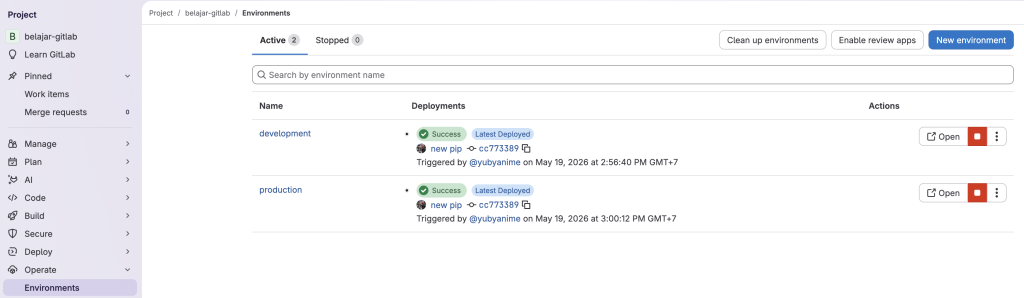
kubectl describe svc nginx-service -n productionHasil UI di gitlab
Troubleshoot
Jika muncul error :
This job is stuck because of one of the following problems. There are no active runners online, no runners for the protected branch , or no runners that match all of the job’s tags: main-runner Go to project CI settings
Cara Fix Paling Mudah
Masuk ke:
GitLab Project Settings CI/CD Runner Settings
Enable Ini
✅ Run untagged jobs
(optional)
dan paling penting:
disable Protected
atau nonaktifkan protection branch.