GitLab mendukung banyak integrasi notifikasi selain Gmail/email. Jadi setiap pipeline gagal, sukses, merge request, issue, deployment, dan lain-lain bisa dikirim ke aplikasi chat atau monitoring.
Beberapa integrasi yang paling umum:
- Slack
- Microsoft Teams
- Discord
- Telegram
- Mattermost
- Rocket.Chat
- PagerDuty
- Opsgenie
- Webhook custom ke aplikasi sendiri
Yang paling sering dipakai DevOps biasanya:
- Slack → notif pipeline/dev team
- Teams → perusahaan corporate
- Telegram → monitoring ringan
- Discord → komunitas/dev kecil
- PagerDuty → alert critical production
Contoh alur:
Developer Push Code
        ↓
GitLab Pipeline Running
        ↓
Pipeline Failed / Success
        ↓
GitLab Send Notification
        ↓
Slack / Telegram / TeamsContoh Integrasi Slack
Untuk ambil webhook di Slack langkahnya seperti ini:
1. Buka Slack API
Masuk ke:
Lalu klik:
Create New App2. Pilih “From scratch”
Isi:
- App Name
contoh:gitlab-alert - Pilih workspace Slack Anda
Lalu:
Create App3. Aktifkan Incoming Webhook
Di sidebar kiri:
Incoming WebhooksLalu:
Enable Incoming Webhooks = ON4. Tambahkan Webhook ke Channel
Scroll bawah:
Add New Webhook to WorkspacePilih channel Slack Anda.
Contoh:
#gitlab-alertKlik:
Allow5. Copy Webhook URL
Nanti muncul seperti ini:
https://hooks.slack.com/services/T000/B000/XXXXXXXXNah itu webhook URL nya.
Contoh penggunaan:
curl -X POST -H 'Content-type: application/json' \
--data '{"text":"Hello from GitLab"}' \
https://hooks.slack.com/services/XXXX
Kalau berhasil nanti pesan masuk ke channel Slack.
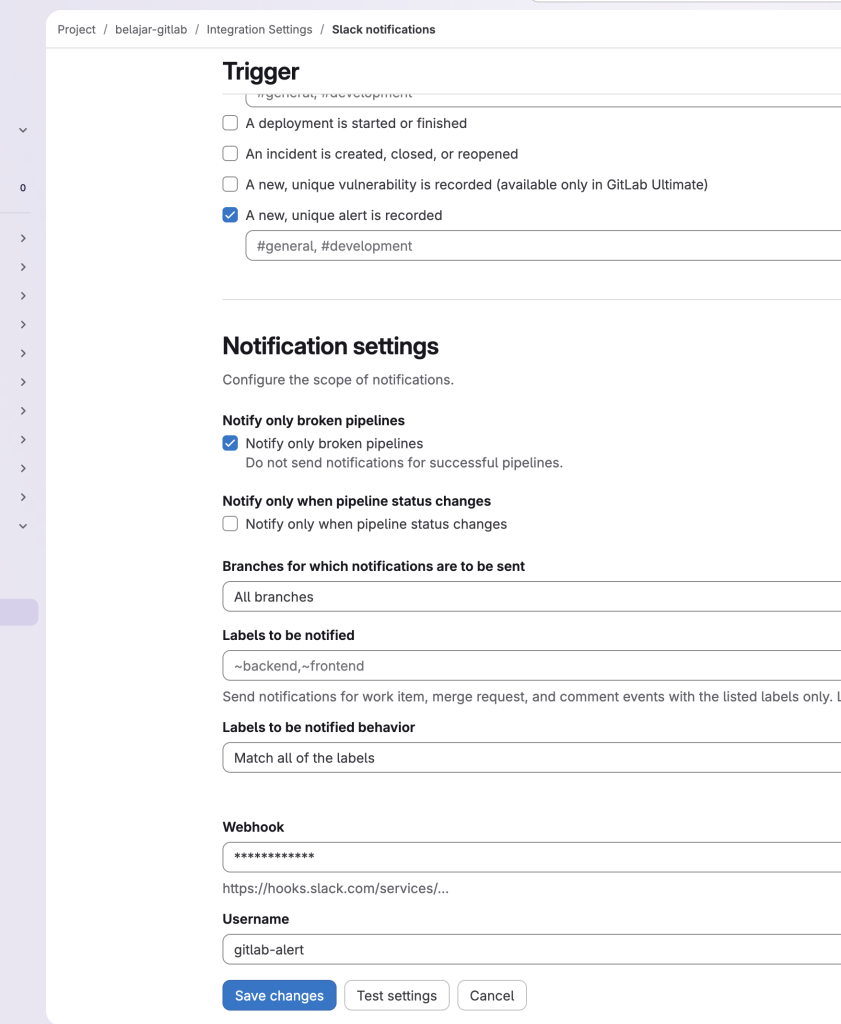
Integrasi ke GitLab
Masuk ke project GitLab:
Settings
  → Integrations
     → Slack notifications
Paste webhook URL tadi.
Lalu centang:
- Pipeline events
- Job events
- Push events
- Merge request events
Save.
Test Cepat dari Linux Server
Di server GitLab Runner / VM:
curl -X POST -H 'Content-type: application/json' \
--data '{"text":"Pipeline Failed ❌"}' \
WEBHOOK_URL
Kalau muncul di Slack berarti sukses.
Bonus: Notifikasi Pipeline Failed Saja
Di .gitlab-ci.yml:
notify_failed:
  stage: notify
  script:
    - |
      curl -X POST -H 'Content-type: application/json' \
      --data '{"text":"❌ Pipeline Failed di branch main"}' \
      $SLACK_WEBHOOK
  when: on_failure
Lalu di GitLab:
Settings
 → CI/CD
   → Variables
Tambah variable:
SLACK_WEBHOOKIsi dengan URL webhook Slack tadi.
Ini lebih aman karena webhook tidak ditulis langsung di repository Git.
Di project GitLab:
Settings
  → Integrations
     → Slack notifications
Isi:
- Webhook URL dari Slack
- Channel tujuan
- Event:
- Pipeline failed
- Pipeline success
- Merge request
- Deployment
- Push event
Lalu save.
Contoh Alert Pipeline Failed ke Slack
Biasanya hasilnya seperti ini:
❌ Pipeline Failed

Project: belajar-gitlab
Branch: main
Commit: fix nginx config
Author: yuby

Job:
- build-image ❌

Open:
https://gitlab.example.com/project/pipelines/123
Integrasi Telegram (Populer untuk Homelab)
Biasanya lebih simpel dan ringan.
Flow:
GitLab
   ↓
Webhook
   ↓
Telegram Bot API
   ↓
Chat / Group Telegram
Kelebihan:
- realtime
- ringan
- cocok untuk K3s / homelab
- bisa dipakai monitoring Rancher / ArgoCD juga
Bisa Pakai .gitlab-ci.yml
Selain integrasi bawaan, bisa juga custom notif langsung dari pipeline.
Contoh:
notify:
  stage: notify
  script:
    - curl -X POST https://hooks.slack.com/services/XXX \
      -H 'Content-type: application/json' \
      --data '{"text":"Pipeline Failed!"}'
  when: on_failure
Atau Telegram:
notify:
  stage: notify
  script:
    - |
      curl -s -X POST \
      https://api.telegram.org/botTOKEN/sendMessage \
      -d chat_id=CHAT_ID \
      -d text="Pipeline Failed!"
  when: on_failure
Yang Sering Dipakai di Dunia Kerja
Small Team / Startup
- Slack
- Discord
- Telegram
Enterprise
- Microsoft Teams
- PagerDuty
- Opsgenie
DevOps / SRE
- Slack + PagerDuty
- Grafana Alerting
- Prometheus Alertmanager